R : Finding the ordering index vector

The ordering index vector is a vector that contains indices of another vector.  It’s basically the other vector, but ordered (decreasing or increasing).  Instead of having the values it has the indices :)  I spent close to an hour to find this line :) And here it is.  In all its glory :)

sort.int(VECTOR, index.return=TRUE)

The result of this command is a bit strange (for me).  It returns an object that contains the ordered vector and the ordered index vector in a list.  Long story short, I can’t access them like I would want to.  So the command I ended up using is a bit more complex:

unlist(as.matrix(sort.int(VECTOR, index.return=TRUE))[2])

Notice that I coerce the resulting list into a matrix.  This results in a matrix containing two elements: [1]->ordered vector and [2]->  ordered index vector. Therefore I chose the second element in the returned list and unlisted it into a vector.  This is what I wanted as I can index a vector :)

Posted in commands, R | 3 Comments

Curious rounding in R

Sometimes R has a misleading way of displaying values.  Check out this series of commands:

> 1111+.5
[1] 1111.5
> 11111+.5
[1] 11111.5
> 111111+.5
[1] 111111.5
> 1111111+.5
[1] 1111112
> 11111111+.5
[1] 11111112

At first I thought that R was automatically rounding the numbers.  So the value got changed if it exceeded certain number of digits.  But in reality R know the real value; it just chooses to display it differently.  To prove this I executed this series of commands:

> a = 1111111 + .5
> a
[1] 1111112
> a == 1111111.5
[1] TRUE

Notice that the value of ‘a’ is not 1111112 but 11111111.5.  I kept on looking and found out that you can modify the way R displays the numbers.  You just need to modify the global variable digits.  This will modify the way numbers are displayed for the rest of the R session.

options(digits=15)

But notice that even though you change the digits option, you don’t change the values themselves.

Posted in commands, PhD, R | Leave a comment

Adjusting point size in R plots.

The trick here is to manage the pch and cex arguments in the plot function.  You can look at more information on these arguments in ?plot, ?par and ?points in the R environment (search for cex and pch).  In general the pch argument controls which type of figure is placed in a specific point.  You can have circles, triangles, squares…  The cex argument controls the amount by which the chosen symbol is magnified.  So you can make symbols bigger or smaller.  In my case I wanted to make them smaller because the size of the original ones was making the plot look funny.  This is the command I used:

plot(variable, type='o' , pch=10, cex=.2)

This scales the symbols to a size that is manageable for me.  for the curious: pch=10 is a cool x inside a circle thingi :)

Posted in commands, R | 2 Comments

How to output an eps figure in R

If you are executing a plot command in a R script it should default to generating a pdf document with your plot.  This is really cool because you don’t really have to think about how to show what you have calculated in your script.  But when you need a different output format you must use the postscript command.

Here is a quick example of how I used it to create an eps image to embed in a latex document:

postscript(file="plot.eps", onefile=FALSE, horizontal=FALSE)

Though the postscript command has lots of arguments, I only used the horizontal to make sure that the image was in a vertical position.

Posted in commands, PhD, R | Leave a comment

About opencv cornerSubPix

There were some issues with some of the classification tests I ran on the chessboard pictures from last week (you can find pictures here).  The ones that were taken from a distance of a couple of meters or less, classified into the correct directories.  But the ones that were taken from far away had this strange error that stopped the analysis and left the pictures were they were (in an un-detected state).

On further study I found out that the reason for the error was that the chessboard points were being inexplicably scattered all over the chessboard.  That is, even though the algorithm had found the chessboard it placed the corners in strange places.  It even calculated a chessboard that did not comply with the initial size given.

I followed the error until the cornerSubPix function call.  The initial findChessboardCorners call was doing its job; but when I tried to further increase accuracy with cornerSubPix, the calculation went wrong for chessboards that were “small”.  After some reading to the opencv documentation and a little experimentation, I found out that the culprit was the winSize argument cornerSubPix.  I don’t know exactly what this argument defines; but if it’s too big, it will damage the calculations made by findChessboardCorners.  To solve the problem I decreased the argument from 11 to 5.

I believe that this argument defines some sort of window size.  If two points manage to fit in one window -because the window is too big, or because the squares are too small (far away)-, then the calculations in cornerSubPix damage what findChessboardCorners calculated.  I’m also guessing that decreasing this argument will make the algorithm more complex.  But all this is just a hunch.

In any case; after making the change to the ilac source I re-ran the test on the images that were left undetected in the previous experiment.  All but three of the remaining pictures went into their respective class directory.  There were two images where the chessboard could not be found.  This is because the picture is taken from very far away (5 meters or more).  I was expecting the algorithm to fail at these distances and was not surprised.  Moreover, we are worried about the accuracy at around 2 meters.

There was one case that misclassified the image.  Though the chessboard was found, the id was miscalculated.  I think this was due to the distance of the picture.  Since the chessboard was so far away from the camera image plane, the number of pixels that made up a square were too small to serve as an accurate calculator.  I’m assuming that this happens only with pictures taken from afar and will ignore this for now.

Posted in opencv, PhD | Leave a comment

Image labeling is taking shape.

After discovering that the accuracy of the chessboard detection is increased by adding a black frame around the chessboard, I went on to create a python library based on what I already had.  I created a python/C++ interface and some python routines that use the C++ code.

At the end of all this I ended up with some primitive routines that will classify pictures that contain the chessboard markers into directories.  It currently takes a list of pictures that have been marked with the chessboard markers and moves them to different directories.  The directories depend on the id that is calculated from the chessboard marker in the image.  This means that one can give the algorithm any number of pictures and it will sort them accordingly into separate directories.  Further sorting and accuracy changes can be done with camera data, but that is not implemented yet.

How does it work?

At the moment it requires a bit of work to see it work.  The src code is located here under the “ilac” branch.  To clone the repository from the ilac branch directly you must use the following command:

git clone -b ilac https://Joelgranados@github.com/Joelgranados/imagelabel.git

After you have cloned the repository execute “make” to build the python/C++ part. While you are in the imagelabel directory (the one that was created with the clone command), you can execute the python command line and import the ilac package.  Once you have managed to import the ilac package, you can use the ilac.get_image_id function to automatically sort pictures that contain chessboard markers.  If you don’t have pictures with markers you can go here for some examples.  That link contains 3 pictures of 2 different markers.  When get_image_id is used, the pictures should go to two different directories.

I tested the code in fedora 14.  If you try to build it in some other distro, you might have a problem.  You can always contact me and I will gladly assist you  :)

Posted in opencv, PhD | Leave a comment

Paper: Fault Tolerance in Autonomous Systems: How and How Much?

Possible research for fault tolerance and robustness in autonomous systems:

  1. Agent based architecture: Though a three tier architecture is predominant in autonomous embedded systems, the agent approach could work because of 1.Avoiding semantic mismatch given that all agents have the same symbolic representation; 2.Increasing modularity by separating functionality into agents.
  2. Plan analysis: Checking plans (created by decisional mechanisms) on-line.  This would arguably increase the validity and relevance of a plan.
  3. Heuristic diversification: Have a pool of heuristics that work inside the decisional mechanism.  All of them can execute at the same time or one can be preferred.
  4. Model diversification: Have a pool of implementations and descriptions of the systems.  In such a way that if one fails, the others can be used.
  5. Fault forecasting: This refers to the estimation, incidence and consequences of future faults.  There have been few studies in fault forecasting.

They mentioned a simulation and fault injection environment that is not yet complete.  It read like a description of what they are still implementing.

Posted in papers, PhD | Leave a comment

Chessboard format

It’s reasonable to describe the chessboard format.  It’s relevant because not all chessboard dimensions are valid,  The current implementation only detects 6 colors and there needs to be a black margin around the chessboard (among other reasons).

Chessboard dimensions:

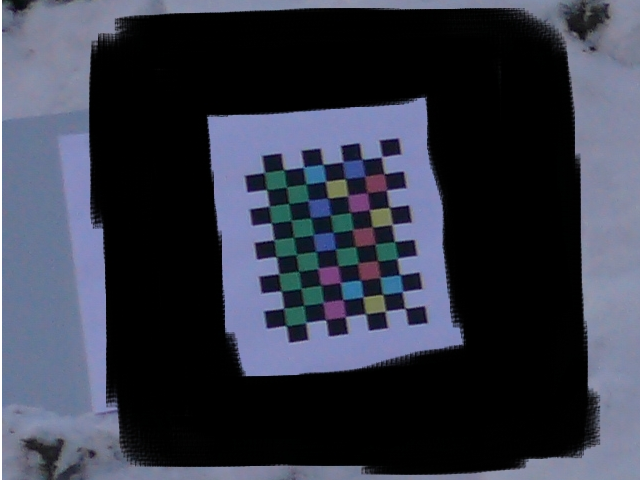
We need to accurately detect the position of every square from every direction.  This is not possible with a symmetric chessboard because one corner can be confused with its opposite.  This becomes relevant when extracting the binary information contained in the chessboard.  Instead of 0001, one could extract 1000.  To avoid this we need a chessboard that has one side with an even number of intersections and the other with an uneven number of intersections.  As you can see from the image (10intersections X 7intersections), the checkered characteristic generates a chessboard that has no equal sides.

Counting sides:

The image has a chessboard that is 11 squares by 8 squares.  But this is irrelevant to the algorithm.  It cares about the square intersections as opposed to the squares themselves.  The reasoning behind this is found in the cvFindChessboardCorners function in opencv.  It takes number of intersections instead of corners.  If you are curious go to [1].  This is not as bad as it seems.  The simple way of calculating the -cS and -cs [2] is to subtract one from each square count.  Finally notice that the image in this post contains 10×7 intersections.

Chessboard Colors:

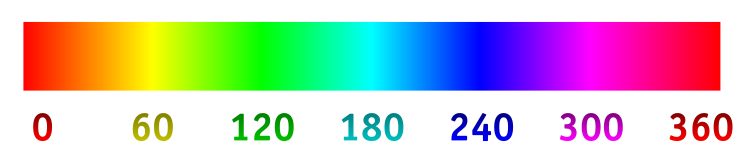
At the moment we are using only 9 colors: red, yellow, green, cyan, blue, magenta, black and white.  White and black are dead colors in the sense that no information is contained in them.  They are there to delimit the other colors.  The contrast that the black squares make against the colored squares allows the algorithm to find the chessboard. The algorithm uses an 8 bit HSV format.  In this format the colors are represented in a cylinder [3]. I chose 6 points in the cylinder as shown in [4] and used those colors to represent bits.

Bit Representation:

Every square that contains a color other than black or white has data.  Each one contains three binary states represented by the three “main” colors (red, green and blue).  If the square is of one of the “main” colors, it will have one bit on and the rest off.  If the square is blue, it will have the blue bit on and the other two off.  On the other hand, if the square is of an “intermediate” (yellow, cyan or magenta), then two bits will be on and the remaining will be off.  If the square is yellow, it will have the red and green bits on and the blue off.  Theoretically if the square is white, all the bits are on.  Though the white square is non functional yet, I don’t see a reason why it shouldn’t work :)

Known squares:

Different lighting situations change the hue value in the HSV format.  This in turn increases error.  To avoid this we have 6 known positions where we put all the used colors [4].  With these known positions we can pre-set the hue ranges and increase the accuracy of the detection.  The known positions start at the top left corner of the image.  Remember that this position can be known even though the chessboard is rotated.

Black margin:

I have already mentioned the reasoning behind the margin in my previous post.  It basically increases the detection accuracy.

[1] Learning Opencv, Gary Bradski & Adrian Kaeblre, page 381
[2] https://github.com/Joelgranados/imagelabel/blob/master/ia_input.cpp#L48
[3] http://en.wikipedia.org/wiki/HSL_and_HSV
[4] http://upload.wikimedia.org/wikipedia/commons/a/ad/HueScale.svg
Posted in opencv, PhD | Leave a comment

Unexpected solution to a detection problem

Before leaving for vacations I was fighting a very curious issue with my chessboard detection algorithm.  All my tests were done with pictures of chessboards that occupied most of the image.  The tests where very positive even for outside picture and under different lighting.  But when I tried to run the algorithm on a picture taken from a distance;  That is, that contained a “small” (because of perspective) chessboard; it failed to even detect the presence of the chessboard.

Thinking that the problem was in the findChessboardCorners function, I went to debug opencv.  One of the things I notice about the chessboard process is that it initially does a thresholding of the image.  I further noticed that this initial step depended on a histogram equalization.  Since this process depends on the overall values of the image pixels, I thought that the fact that my test images contained mainly snow (white pixels) was the culprit of the problem.  I went to gimp and started to darken the image.  To my surprise the darkening did not work as I expected.  It did increase the amount of sub-squares that were being found, but it did not detect the chessboard.

Finally, after some trial and error, I discovered that if I surround the chessboard with a thick black square (always careful to leave some white between the square and the chessboard), the algorithm would always detect the square (no matter how small it was)

This image is a part of a larger image.  I put it here to show the way that I encapsulated the chessboard image in a black square.  Notice that there is still a bit of white between the chessboard and the black square.

I am now going to create two chessboard images.  They will have different color codes and therefore different numbers. Both will have a black border to enhance detection.  The idea is to try to make an algorithm that will automatically group images depending on their chessboard code.  I will also try to add code that corrects various camera distortions.

Posted in opencv, PhD | Leave a comment

Back from paradise.

Today is my first day in the office since my long Colombian holidays.  I need not stress how awesome it was to go back to my home town and share experiences with my past :)  Today (besides trying to overcome the jet lag) I make a “where is Joel” list.  Here is what I came up with:

  1. Python Review:  This was some code that Philippe gave me to give some feedback.  After checking my mail, I am now sure that I sent Philippe some patches with my suggestions on the matter.  I think there are things that could be reviewed further, but I chose to leave it like it was and wait for feedback from Philippe.
  2. Picture Normalization with image markers:  We still have a problem with the algorithm not wanting to detect chessboards that are small (small within the picture).  I think this is due to the opencv code.  I plan to create a patch and make the detect chessboard function in opencv work for smaller chessboards.
  3. “movement” detection based on daily pictures:  The idea is to use what is already implemented in opencv.  seems like it should at least detect places where changes occur.  After having the algorithm that detects these changes we can create one that classifies the types of changes and selects the ones that are related to specific flowers.
  4. Dependability:  Continue reading.  Take notes.  Maybe start a dependability notebook.  The objective is to relate what we are doing with DMU and WiSN with current dependability concepts to advance in WSN dependability.
  5. CMU camera:  I received a new camera circuit that is double the resolution of the previous one.  This circuit needs to be connected to the main CMU board.  To make this work, I have to change the firmware that comes with CMU so it can handle double the amount of pixels.  I have read some comments on the CMUcam wiki about this.  Though I have not found a person that has done it, it should be possible.
  6. CITRIC:  New camera module with 1.3 megapixels resolution.  The objective with this module, for now, is to make it work.  I will try to create a simple camera application so we can test the resolution.
  7. Annotated DMU Pictures:  Have already updated the annotation in effdas.itu.dk.  This means that, with the right permissions, one can download the pictures with the latest reviewed annotations.  Still have to find some use for the little computer.
  8. Imotes2:  I found out that Intel released a new I mote version.  I’ve been meaning to buy them, but since I have the CMUcam and CITRIC platform to play with, I have been postponing this.
  9. Class for EAFIT: While I was in my home town I spoke to my professors in my old university.  One of the mentioned that If I could create a small class/module that talks about the things I am doing at ITU, EAFIT would pay my tickets to Colombia next time.  Since the Denmark-Colombia ticket is not the cheapest thing you can get, I am seriously thinking on doing this for the end of this year.

These are the macro points that I thought of in an hour of pondering :)  Any comments are greatly appreciated :)

Posted in Uncategorized | Leave a comment