Making sense of my software.

Today I needed a functionality that I was sure that I had already coded.  Given that I have a bunch of active projects in different places in a semi-active status, I got a little confused and it took me some time to realize which one I needed.  This post is intended to clear things up.

ImageAdjust: This was my first experiment with some camera homography.  It wanted to normalize a group of pictures taken from different 3D places into a group of pictures taken from the same 3D place and same camera orientation.  I was successful in reaching my objective, but I transferred all the functionality to a second project called imageLabel.  I need to retire all instances of this project or point to the newly created imageLabel.

ImageLabel: It began as a fork of ImageAdjust.  After adding some features and removing all the unwanted crap from ImageAdjust the result was a new project.  Things to highlight: 1.I moved to cmake, 2. I added a feature that will detect colors inside the chessboard pattern and output an id.  3. I kept the auto-correction logic from ImageAdjust. 4. I used C++’s object oriented stuff (makes the code more compact).

Annotation: Has always been the application for doing the annotations.  I have steadily been working on the codebase and am very happy with the result so far :)

crex: It is a command used to extract annotated crops from annotated images.  It puts all the cropped images in a directory and is good for pre-processing the images before doing stuff like HOG.  This I did not publish and do not intend to because all the logic is going into a new project called caflor.

crhog: Crog  came after crex and was a project that applied the HOG features to cropped images.  The workflow consisted in using crex to crop out the annotated images and then to used crhog to calculate the HOG features.  This functionality is going into a new project called caflor.  To work with crhog I am using a modified version of learcode (both are in git hub)

caflor: Is the piece of software that I am working on that intends to put together crex and crhog under the same roof.  I have not made it public yet because it’s just not finished :).  This projects should actually encompass all the software needed to make the flower detection possible.  Lets see if I can keep all the crap under the same name and in some kind of acceptable order.
Posted in annotation, PhD | Tagged , , , | Leave a comment

The auto adjust exposure from ufraw.

The pictures I receive from the biologists are in raw format.  This is good as it allows for tweaking before you put the picture in a more friendly format like jpeg or png.  I’ve been using a really cool tool to adjust parameters in raw format images.  ufraw is a GPL licensed program that can run standalone or as a GIMP plugin.  It has an extensive list of features that lets you modify pretty much everything in a raw image.

I initially did a chromatic aberration correction.  I was very happy with the results and was toying with the idea of doing an automatic exposure adjustment.  But when I did it, the number of overexposed pixels increased.  After the adjustment, the pictures had a better contrast and in general looked sharper.  But I was worried that I would be loosing some pixel information.

To make sure that the overexposed pixels were increasing I saved an image with the adjustment and one without.  I then went to Matlab and counted the pixels that were equal to 255 in both.  The unmodified image had no overexposed pixels while 4% of the adjusted image was overexposed.

My code in Matlab looked like this:

>corrected = imread(‘correctedLHH20110601-0148.png’);
>normal = imread(‘normalLHH20110601-0148.png’);
>( sum(sum(corrected(:,:,3)==255)) +
      sum(sum(corrected(:,:,2)==255)) + 
      sum(sum(corrected(:,:,1)==255)) ) / 
   (size(corrected,1)*size(corrected,2))
>0.0427
>( sum(sum(normal(:,:,3)==255)) +
      sum(sum(normal(:,:,2)==255)) +
      sum(sum(normal(:,:,1)==255)) ) /
   (size(normal,1)*size(normal,2))
>0
 

The results vary with the images you try out.  But the fact is that the overexposed pixels increase in some pictures and that should bring the performance of the classification down (depending on where the overexposed pixels are located).  So I’m going to avoid using this feature for now.

Update 19-07-2011:  I kept thinking about this at home and realized that the pixels that result in a 255 value were probably pixels that were in the far end of the histogram to begin with.  The algorithm is probably stretching the histogram in such a way that the outer pixels get put in the 255 bin.  There might still be loss of data but it’s not the type where a pixel of value 1 gets a value of 255 (though it depends on the image :).  In any case the error calculation is not as easy as my procedure in this post.

Posted in wireless image sensor networks | Tagged , , , | Leave a comment

Image segmentation based on pixel color: update.

I have continued to play with this and have increased the quality of my results.  I have done some changes to the initial processing and I still need to experiment with lots of possibilities.

Neural Network Performance comparison
  1. Color space.  I stuck with the HSV.  I did an experiment with YCbCr and was not impressed by the results.  While I am using all of the HSV dimensions, I still think that I can do without one.  I also read a paper yesterday [1] that stated the possibility of combining different dimensions from different color spaces.  This could be something that increases the accuracy (I have to look into it).
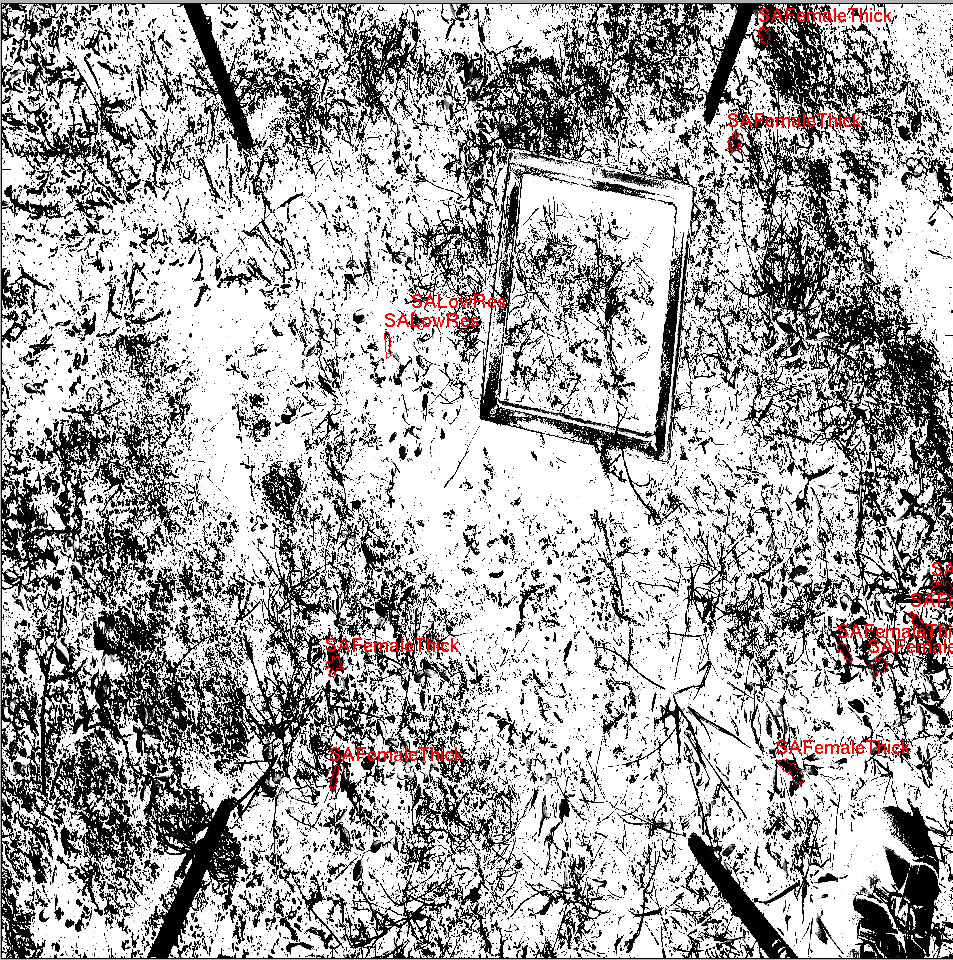
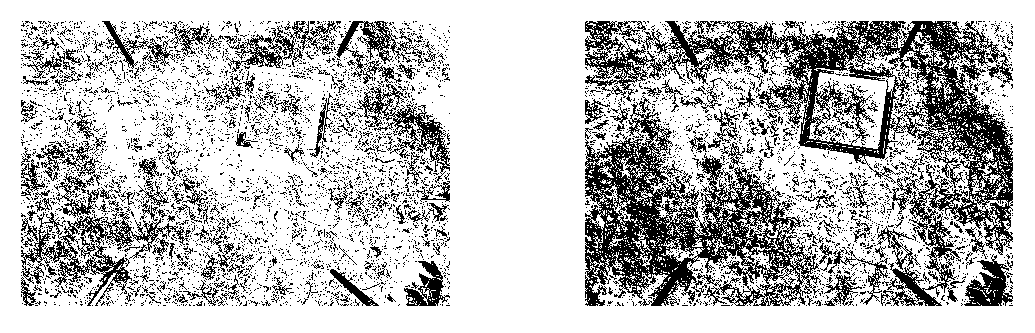
  2. Negative annotations.  I re-annotated the pictures to add negative annotations.  I added annotations to sections with dry leaves, dung, dirt patches and artificial plot markers.  As seen in the picture the re-annotated picture (left) is less noisy than the original one (right).  For the re-annotated picture I made sure that the flowers were still appearing as black blobs.  This means that lots of non-flower pixels that where previously classified as flower pixels are now correctly classified as non-flower pixels.
  3. Neural Network.  I am training the neural network with two types of inputs: flower and none-flower.  I observed that giving the neural network all the flower sub-types as one type gives good results.

Problems:

I have a lot of non-flower pixels.  I have approximately 12×10ˆ6 non-flower pixels. Compared to 0.9×10ˆ6 flower pixels (That include all the sub-types).  To keep the training time to a minimum I chose approximately 0.9×10ˆ6 non-flower pixels.  I did not do a good job at choosing them though as I don’t really know what type of non-flower they are.  They could be any combination of the negative annotations and are probably biased towards the most common non-flower annotation (artificial markers).

I want to solve this by doing a better job at gathering the none-flower pixels.  Instead of choosing my initial batch of none-flower pixels from images that had no flowers at all, I will now choose them from all the pictures.  The reasoning behind this is that the background in situations where there are no flowers is different from situations where there are.

I’m also slightly modifying the negative annotations.  This time around I want to distinguish the types of non-flowers and make sure that I include all of them in the additional training set.

[1] Fast Pixel Classification by SVM UsingVector Quantization, Tabu Search and Hybrid Color Space
Posted in PhD | Tagged , , | Leave a comment

Image segmentation based on pixel color looks promising

Finally some expected results!!!

Past Week(s):

Original picture

Original picture

After consulting with some very talented computer vision professors, I decided to continue with Image segmentation based on pixel color.  The idea is to segment the image based only on the value of a pixel.  This means that there is no neighborhood information in the calculation.

To accomplish this, I had to re-annotate the pictures from zackenberg with polygons instead of rectangles.  The problem with the rectangles was that they included pixels that were not part of the flower.  Since I was going to do a classification between flower/non-flower pixels, I had to use something that could describe the shape of any flower as an annotation. The impoly command in Matlab seemed like a very good option.  This command lets you interactively create a polygon in an Axis.  Once the polygon is finished, it allows you to change its vertices and its position.

Experiment:

  1. Color Space: I considered RGB, HSV and YCbCr.  I chose HSV for the initial experiments because it showed a good separation.  After HSV, I will continue with YCbCr and try to mimic what Son Lam Phung et. al. did in “A Universal and Robust Human Skin color model using Neural Networks“.  I need to reduce the amount of components of the color space (At the moment I am using all of them).  For HSV, the hue and value might be all I need.  For the YCbCr, the Cb and Cr components could be enough.
  2. Annotation changes: I increased the number of subtypes for Salix Arctica.  The
    Masked Image

    Masked Image

    reason for this is that the two different types of females have different color and the three different types of males also have different color.  I now have 8 subtypes.  These include a type that gathers all the low resolution annotations (You can tell it’s a Salix Arctica, but it’s too blurry type).

  3. Classification: At the moment I have only tried binary classification.  In other words, I take pixels from a subtype of Salix Arctica and classify it against some None Flower pixels.  I do this for all the subtypes of Salix Arctica. I also want to classify the 8 subtypes (plus the none flower type) in one go and see if it gives better results.
  4. Neural Network:  I’m using the newff command from Matlab.  I use a neural network with 10 hidden units and 10 epochs (I will vary these parameters to see if I can get a better result).  I also want to try SVM; given that I am doing a binary classification, an SVM is a logical choice.
  5. Negative annotation:  I think this process would improve if I do some negative annotation.  The non-flower pixels are taken randomly from pictures that I know have no flowers.  What I plan to do is to annotate the regions that I know the algorithm is mis-classifying (like the sticks in the figures) and re-run the neural network training to strengthen the model.

Results:

Zoomed Masked image.

Zoomed Masked image.

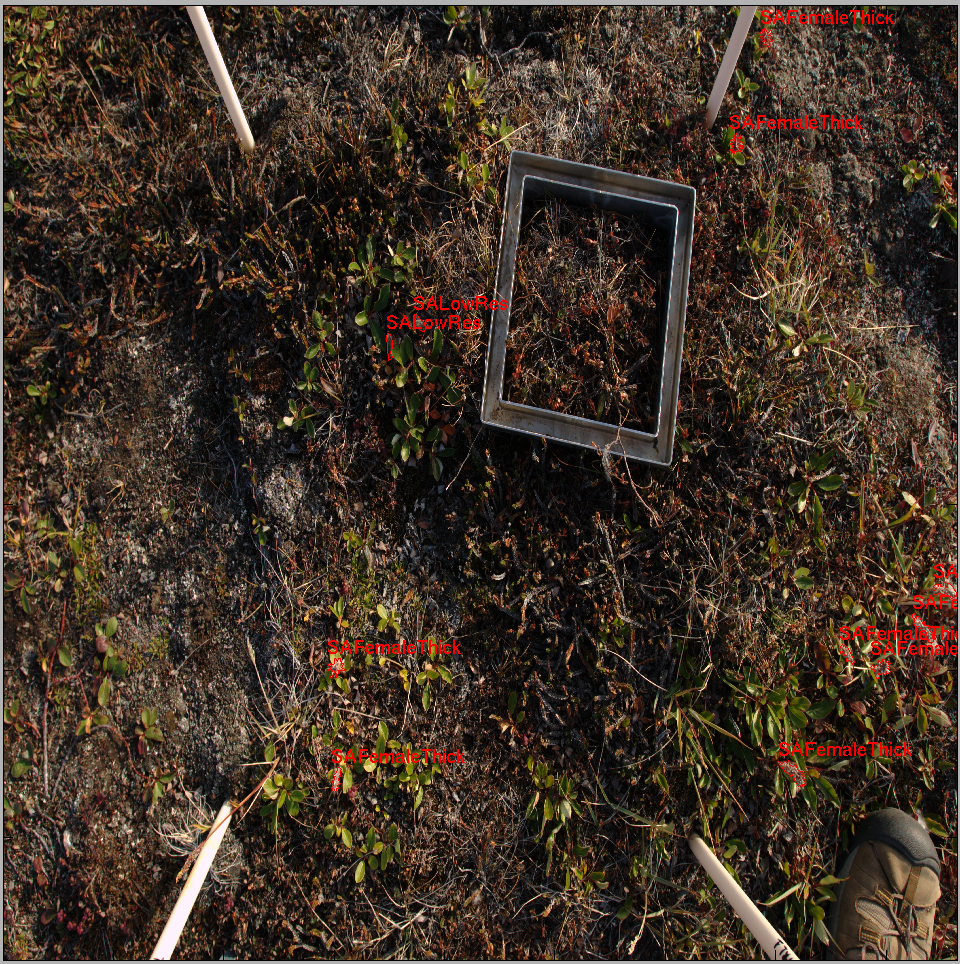
In the figures I show the results for Salix Arctica Female type.  The first image shows the original image.  The second image shows a black&white representation of the result of running the Neural Network on the original image.  First thing to notice is that white is non-flower and black is flower.  From the masked image we see that the artificial markers (the sticks stuck in the ground) show as flowers and that the photographers shoe also gets classified as flower.  We can avoid these mis-classifications with negative annotations in these regions.

Another thing to notice is that there is a tendency towards white in the image.  This means that if we use this as an initial filter, we could save ourselves a lot of computation when skipping the non-flower regions. Also notice that there are lots of black regions in the image that are not really flowers.  This means that we still need to do a bit more analyzing to get error rates that we can live with (but this is a great start!!!).

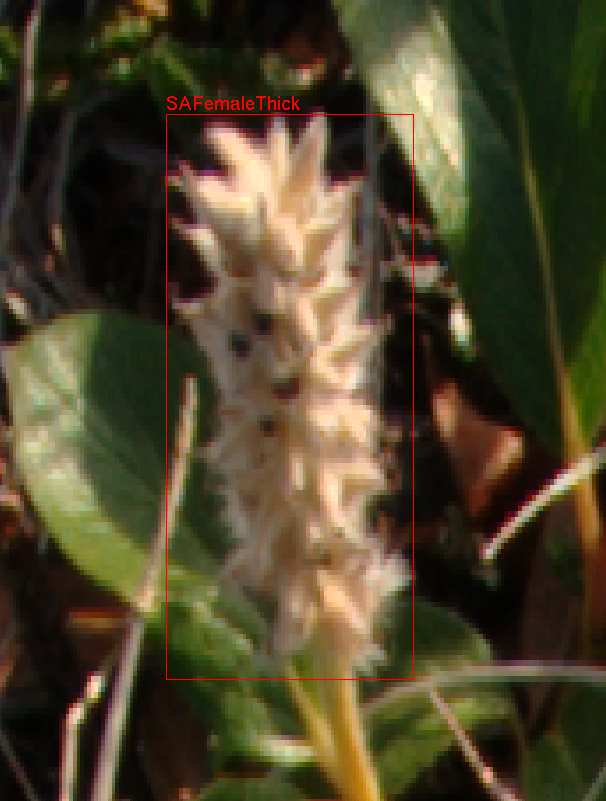
In the last image I zoomed in one region that contained a group of Female Salix Arctica.  Notice that this zoomed image is annotated and that what is contained inside is mostly black pixels.  This means that this method could give lots of false positives but very little false negatives.

Posted in PhD | Tagged , , , | Leave a comment

Salix Arctica Albino Female

Albino Salix Arctica

Albino Salix Arctica

I have began to re-annotate (for the third time) the pictures from Zackenberg 2009.  This time I am replacing the rectangles with polygons so I can better annotate the flower colors. In the process I came across a peculiar type of Salix Arctica female (At least I think it’s a female).

I realized that it was a bit different from the “usual” females because the color resembles a very light pink, instead of the red that I am used to.  I don’t really know if this is yet another type of female, if it’s being eaten by larvae or if it’s just dying.

Until I get some feedback from the Biologists, I’ll mark these as Low resolution pictures.  Which is the label that I use to describe everything that has a hint of strangeness.

Posted in Uncategorized | Leave a comment

imroi: bloated Matlab commands

I was working with rbbox on my Matlab GUI application to create squares that marked important stuff inside an image.  I recently needed to move away from the rectangle based approach to a polygon based approach.  This meant not using rbbox.  I found cool im* commands that did what I needed.  These commands include imrect, impoly and imfreehand.

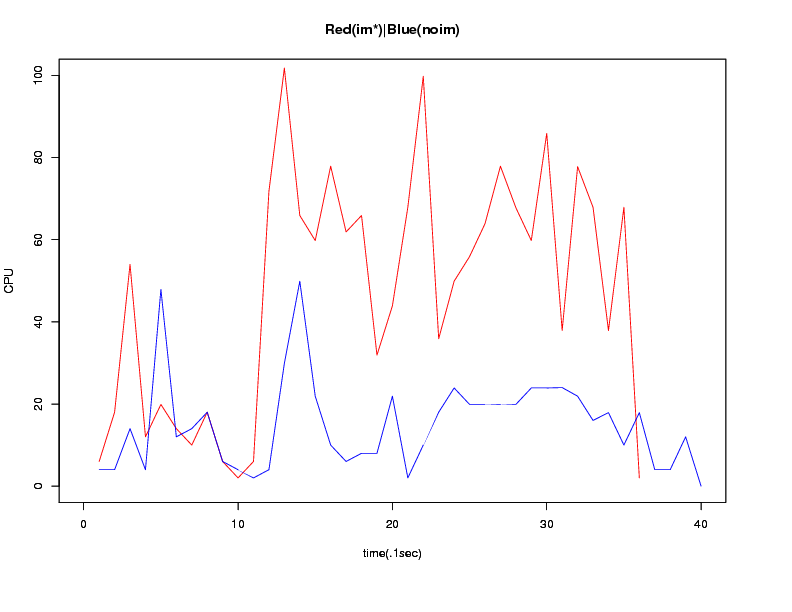
Today I pretty much finished the coding of the new version (with some little issues to resolve).  When I did my final tests, I noticed that the new version lagged just a little when doing annotation actions (creating, moving, deleting…).  I took this a bit further and did a very simple “top” based test to compare two versions of the GUI. The first version is the current one that implements the annotations with im* commands.  And the other version is the one that I replaced that used the rbbox command.

Matlab command comparison

Matlab command comparison

In the figure, red line means the execution with the rm* functions, blue means rbbox.  Notice that at the begining there is a spike that is comparable in the two cases.  This is the GUI initialization.

In both lines there is a second spike that represents the start of a rectangle creation.  Notice that the imrect (red) command uses 100% of one of my CPUs while the rbbox uses 50% approx.

After I created the rectangle I stretched it a bit before finalizing the tests.  Notice that the stretch action in the imrect line (red) is eating at my CPU.  It has a second spike that reaches close to 100%.  While the rbbox line (blue) has a milder footprint and does not go past 50%.

So: What is imrect doing that eats up most of my CPU?  I have no idea :(. But it’s annoying.  One explanation could be the extra functionality that im* functions bring to the GUI.  But given the performance of rbbox, I’m left with the impression that it could be done better.

Posted in annotation, commands | Tagged | 7 Comments

Paper: A Universal and Robust Human Skin Color Model Using Neural Networks

The paper is interested in classifying pixels as skin/no-skin.

  1. They use YCbCr color space for their experiments.  They analyse the behavior of this color space with respect to skin color.  The found that the Y dimension does not have a specific value when it comes to skin.  But when they looked at Cb and Cr they found that their values hovered around specific  points of the plot.  This is what led them to use YCbCr.  They further plot Cb against Cr for skin pixels and it describes a nice cluster.
  2. The Neural network they used was 2-N-1.  The input where two neurons for the Cb and Cr value.  The output neuron was thresholded into a skin/no-skin value.  Their experiments showed that 2-25-1 was a good setup for the Neural Network
  3. They didn’t describe how they did the initial annotation.  It stated that they used some third-party software for that purpose.
In general I think this is a good place to begin the pixel color based classifier analysis.  My idea was similar to what this paper describes.  Finding it described in a paper reassures me to go forward with the approach.
Posted in papers, PhD | Tagged , , | Leave a comment

Don’t forget we are working with time series.

In the past weeks I have been looking at feature extraction methods like HOG, SIFT and SURF.  These papers have given me great insight and some ideas. While I was reading these papers, I was always thinking to myself that they did not exploit one of the main characteristics of my problem: I’m working with time series.

I’m wondering what other approaches there are to extract features from a series of pictures taken from the same place.  What we will have in Zackenberg is a time series of pictures that will document the growth (phenological change) of the flowers.  It will contain pictures of different stages in the flower’s growth.  Moreover, it will contain pictures with different lighting of the same stage of the same flower.  This is all additional information that can be included in the feature and could be used for detecting.

I’m also expecting that the process needs to be spread out within a season as opposed to just taking information from one picture.  The workflow needs to be “incremental”.  At a particular moment in time, it needs to gather image information (plant location, species, sex…) from the start of the season so as to have correct conclusions.  It can happen, for example, that a flower becomes occluded at the beginning of the season and comes out again towards the end.  This is information that can be used to add to the accuracy of the flower count.


Posted in Uncategorized | Leave a comment

Better annotations -> Better PCA.

One of the issues that I identified in previous posts was that the original annotations were not of good quality.  This included annotations that were incorrect and annotations that pointed to images that did not have enough differentiating information.

I took half of this week to review the annotations and remove the ones that had mistakes and were of very low quality.  With respect to the low resolution annotations, I noticed that the biologist could make a pretty good guess of what type of flower it is based on position, surrounding vegetation and previous images of the same place.  This created cropped images of very poor quality that could not be differentiated when presented without context (previous images and surrounding pixels).  With this in mind I think it best to give an annotation a label if and only if one is sure that it will be recognized without context.

Something that might be useful to increase the quality of the annotations is to create a re-annotation process based on the cropped images.  This would take place after the initial process of annotation.  The biologists would receive a list of cropped images and they would have to re-annotate them (but this time without any context).  We would keep only the cropped images that have the same label in the initial annotation process and in the re-annotation process.

As a side note I want to state how painful it is to create/review the annotations. It’s a process that is highly monotonous and stressful. In the 2009 flower dataset there are close to 300 pictures.  All pictures have a resolution of 4000×3500 pixels and we are searching for flowers that are contained in windows measured in tens of pixels.  This creates stress on the eyes and on the hand handling the mouse. Notice that the initial annotation took months to create and validate and its review took half a week.  I’m constantly trying to modify the annotation software to make this process easier [1] but the changes are sometimes not clear from the HCI perspective.

Reviewd PCA

red:bud,green:female,blue:hair,magenta:male

With that out of my system we can no move to better news :).  After I finished reviewing the annotations I ran a PCA on the calculated HOGs.  This time around I implemented a mirroring feature that would allow me to mirror the cropped images. This is something that Navneet Dalal did in this HOG paper.  He only mirrored the images along the y-axis (its logical since you don’t see a lot of people walking on their heads).  For my purposes I mirrored my data along both axes.  This means that one cropped image produces 3 mirrored images (quadrupling the number of data points).

The figure shows the first two PC components plotted in a 2D plane.  We notice that the buds are still a very separable cluster within the data (red in the figure).  The cyan and the green still have a significant overlap but display a small tendency towards opposite directions.  The green tends towards the upper-right and the cyan towards the lower-left (green is female and cyan is male).  The blue is scattered throughout (blue is Salix Arctica hair).

After these results I am more convinced that we need a better way of collecting training data. One thing that could be done is to avoid the fish eye lens.  A lot of the very low resolution annotations were on the perimeter of the pictures taken with a fish eye lens.  They were highly distorted and had poor resolution.  Another possible solution is to get the camera a bit closer so we can get a better view of the male flowers. This to avoid confusing male flowers with female flowers. Recall that there is a type of male flower that is very similar to the female flowers; this is exacerbated by the fact that the cropped images are of poor resolution.  Getting the camera closer might just give us the extra information needed to differentiate them in the annotation process and in the automated feature extraction process.

Finally, I believe that the markers that we deployed this summer are going to greatly improve the annotation process and therefore give us a better training set.

Things can only get better!!! ;)

[1] https://github.com/Joelgranados/annotation

Posted in annotation, PhD | Leave a comment

Paper: Digital Image Classification for Malaysian Blooming Flower

This paper has an impressive related work section.  It describes work done in image processing related to segmentation and Neural Networks.  From the context I believe that the paper only tries to detect one type of flower (The title also points to this). But this is never made explicit inside the paper.

The process they followed was based on flower segmentation.  Not really sure how the segmentation was done.  The paper does not go to great lengths to describe their procedures. They mention a Otsu’s method to compute the global thresholding after which a morphology process is applied (none of them are described, they are cited).  In general, they convert the image to grey-scale, segment the background from the foreground (flower) by thresholding which results in a binary image and finally select the “flower” pixels with the positive part of the binary image.

The feature extraction was as vague.  They say that they used two features: Color and Texture.  For the colour they say that they use HSV colour space, but don’t specify how the features were calculated.  For the texture they state that they used gray-level co-occurance matrix (GLCM).  From this they only used the contrast, correlation, energy and homogeneity as features.

Posted in papers, PhD | Leave a comment