sshfs: where were you all along :)

Did you know that you could mount a remote directory (any directory accessible to you) through an ssh command? I was reading 16 ultimate ssh hacks by Carla Schroder and found out this little piece of heaven. The command is sshfs. You use it in the following way:

sshfs USER@SERVER:REMOTEDIR LOCALMOUNTPOINT

There are also some really cool comments on slashdot about further ssh candy.

Posted in commands | Tagged , , , , | Leave a comment

Rscript, where were you all along?

One of the things that I did not like about using R was that there was not “easy” way of calling it in a command sort of way. The test part of my R workflow consisted in going into the R environment and setting everything up from scratch. This was a pain (to say the least). Another problem that overly annoyed me was that I could not get to the script arguments. My solution to these and more problems was to use the -e argument of the R command (not good).

Today I find out that I was overworking myself all along. Since R 1.5.X it has something called Rscritp, that allows the execution of R scripts in a “hashbang” sort of way. This saves me the trouble of having to directly execute R for testing. I can now code a script and add a “#!/usr/bin/Rscript” to the header so it can do the “right” thing.

But it does not end there… The arguments can be  accessed by using the commandArgs() functions. This is OK, but you still have to do quite a lot of analyzing to get the command line parsing right. If there was only something like getoptparse…. It turns out that someone has already been down this road and was kind enough to make an R package for that. I present to you the getopt package. So now I can parse those arguments in a sane way.

This has made my day :)

Posted in commands, PhD, R | Tagged , , , , , , , , , | Leave a comment

Systematic Literature Review (SLR)

This is a very interesting way of gathering relative information for ones research. I like it because it is repeatable and somewhat measurable. I read a paper by Paolo Tell that described the process quite nicely :). Here is the link.

Posted in Uncategorized | Leave a comment

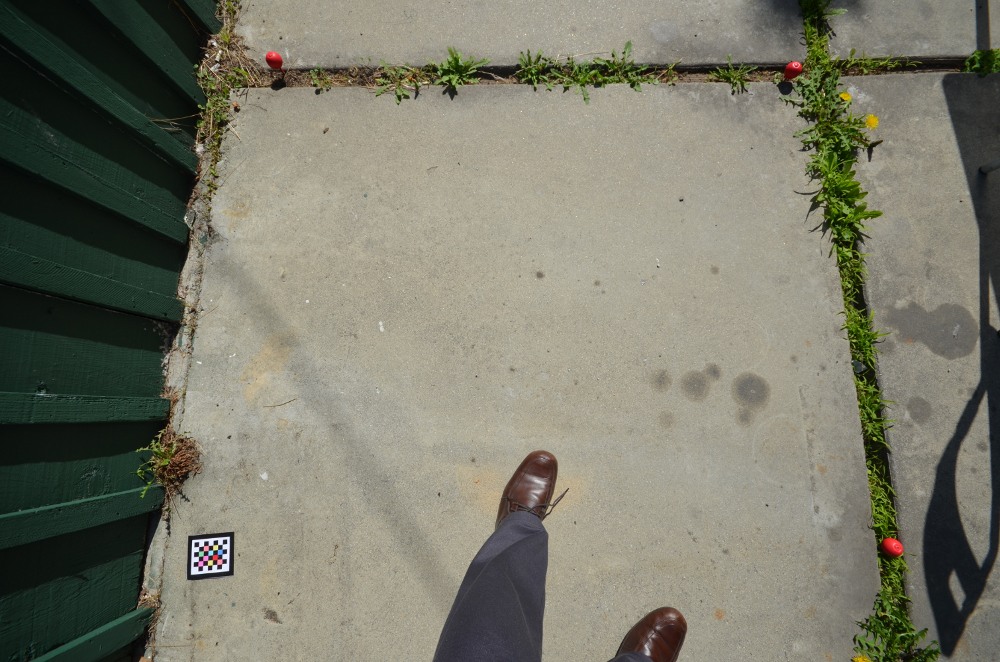
An example of a good plot picture.

This post is meant to show how a “good” plot picture looks like. I did the tests in my back yard.

Things to note are:

  1. All the markers are completely visible.
  2. The chessboard marker is completely visible when all the squares and the black margin can be seen.
  3. My foot is in the shot. This should be avoided as much as possible.
  4. The sphere markers have shadows facing the shot. This should be avoided if possible, but should be OK when we run the algorithm. Look for an angle to minimize this.Good Plot PictureGood Plot Picture
  5. Most of the sphere is noticeable. Thought they will be close to vegetation, we must try to maximize visibility.
  6. How deep you place the sphere on the ground will depend on surrounding vegetation and stability. Putting it as low as possible so it does not get blown away, but is completely visible.
  7. The red chessboard goes with the red sphere markers.
  8. There are no shadows on the markers. This could hinder the algorithm from correctly detecting.

Remember to take more than one picture of the same plot from different places. This will increase the possibility of getting a “good” detectable picture.

Posted in Uncategorized | Leave a comment

R: Index of an interval of a number in a vector

Try findInterval :).

Let me try to explain what I mean with this title. I have a vector of numbers. The numbers represent bin limits. For example c(1,2,3) is a vector that represents 2 bins. The first is [1,2) and the second is [2,3]. I need a function that returns the bin index given any number within the vector range (in our example the range is 1 to 3). So the function must return 1 if it receives a 1.4. It returns 2 if it receives 2.7 etc…

The function you are looking for is findInterval.

Posted in commands, R | Tagged , , , , , , | Leave a comment

Define the model to use

I have defined two models that I want to use for my experiments with the CENS data set. These models are based on Eric Graham’s previous work. Both of them are Naive Bayesian Models with a slight twist :).

I created a latex document that described the way I’m going to apply these models to the data. The document itself is still a draft and will be changing in the future (hopefully). The link to the source code is here. You can find the pdf in Bayesian Model Definition.

Posted in Uncategorized | Tagged , , , , | Leave a comment

Handle fixme’s in a latex document.

I’m guessing there are many ways to handle this; this is just the one I feel comfortable with :). I like it because it shows me the things I still need to do in the resulting document. So when I read a draft of my masters degree, I will know what needs to be fixed.

\usepackage[footnote,draft,silent,nomargin]{fixme}
\begin{document}
…. bla, bla, bla….
\fxnote{Text describing the todo :)}
…. bla, bla, bla….
\listoffixmes
\end{document}

This will create two places where to see the “fixme”: 1. in the footnote on the page where the “fixme” was written and 2. at the point where \listoffixmes is executed. Both these reminders are very useful when proofreading a document. You’ll have a “bird’s eye view” with the index and you’ll have specific context with the foot note :)

Posted in PhD | Tagged , , , | Leave a comment

The average of an angle… (mean of Hue Value)

My solution to this issue was to write a bunch of code to handle the behavior of the average calculation at the 0 and 360 points. It was a pain in the neck, and I probably have it wrong :(.

Today I retook the issue and found various ways of doing the average calculation with less code and more math. This stack overflow link has really cool links and ideas. I really like the following algorithm to handle the calculation:

x = y = 0
foreach angle {
   x += cos(angle)
   y += sin(angle)
}
average_angle = atan2(y, x)

There is also a link on wikipedia briefly explaining stuff about means of circular quantities. Here is a paper on google docs that also talks about this issue.

I unfortunately did not find a way to do it with opencv. Which is strange given that you might want the mean of an HSV image. I guess the way to go is to convert it to RGB, calculate the mean and then try to use the RGB->HSV equations to find the Hue mean. However, this seems just plain wrong. Additionally the cv::mean functions do not provide (according to the documentation) a facility to differentiate between a regular Cartesian mean and an angular mean.

Posted in opencv, PhD | Tagged , , , , , , , | Leave a comment

The annotation GUI

Are current objective is to try to make the photo-plot based phenology work-flow comparable to the current phenology work-flow. To accomplish this we need to streamline the process of making the annotations on the images. We want to reduce, as much as possible, the amount of time it takes to annotate an image. With this in mind I want to list a few characteristics that the new annotation GUI that should go into the final design.

  1. Do we really need a list of images?
    Remove the current file name list. This is not suited for organizing images of different plots taken in different dates. We should give the user control over 3 specific aspects of the visualization:

    1. The plot she is working on. This can be communicated with plot id or we can have a map that contains the locations of the plots.
    2. The date of the image that the user is visualizing. We can have a slider that all the dates where there are pictures. This slider can be something similar to what Gigavision has.
    3. Give the user the options of controlling the date range. Give her the option to define when the date list should start/end. Again, somewhat like Gigavision.
  2. Bookmark Option:
    It’s important for the user to start where she left off. We can create a button named “set bookmark”. It will take text that is placed in a text area (default can be current date/time) and place in the data base.  It will relate the plot id and date where the user was.
  3. How do we keep track of all the changes?
    The idea with this new version is to be able to create the annotations from different clients. We can create a client-server structure where the server will multiplex incoming queries. The client will be responsible of the GUI.  I was playing with the idea of coding it in Java, but there is no reason to not do it in Python or the like.
  4. The annotated elements are constant through time.
    Since what we have is a time series from a plot, we will see the same element as it changes in time. This entails that each element of interest (the flower) should have a name that is maintained through time. This name will be given upon first creation and should be just a number. There will be metadata related to this name: things like species, sex and other user defined metadata.
  5. Filtering:
    There could be lots of annotations in an image. We can implement a filter to make things better. I saw this in Gigavision and think its pretty smart. It should be something that we leave for when the main functionalities are ready. Additionally, when the filter is activated, the annotations in the image should reflect what the user has filtered.
  6. Navigation: How to change plot? How to move forward/backward in time for the same plot?
    To begin we must notice that our problem has one additional dimension compared to Gigavision: We have lots of plots. This point complements #1. We need to be aware of plot ID, date and perspective. Perspective is the different angles that a plot might have in a specific date. Remember that the technician is encouraged to take various pictures of the plot. These will be denominated perspectives.
    For each plot ID/Date pair we will have a list of perspectives. The user can then choose which perspective is best; Choose to discard certain perspectives; Order perspectives according to importance.

I would lie if I said that Gigavision has not been a inspiration for what we are to do. But notice that our product is not going to be an annotation system. Our product is going to be the proof that an annotation system -like Gigavision- has the potential to add value to phenological measurements as we know them :)

Posted in Uncategorized | Leave a comment

CENS at UCLA

For my stay abroad I had to come to CENS at UCLA. The advances related to novel methods for collecting and analyzing ecological data is synchronized with what I have been doing for the past couple of years. I arrived a couple of weeks ago and after a short vacation, I have started to work alongside Eric Graham.

He has a series of scripts that he is using to analyze image data from various projects related to CENS. I have taken a look at the scripts and am currently in the process of understanding them. Though they are no longer available through github, you can find more up to date imaging code related to ecology hereherehere and here.  You can also look at my EcoIS and EcoIP projects for further reference on the work done in UCLA.

I have analyzed about 20% of what he has and see that he is doing what I have been trying to do all along (segment an image based on other images to elucidate additional data, like number of flowers). I’m not yet sure how successful these scripts are with the data he has nor am I sure if they can be used with the images we have from Zackenberg. Time will tell :)

I’m excited to be here and plan to take advantage of my stay in all respects :)

Posted in PhD | Tagged , , , | 2 Comments