Zackenberg Weekly letter.

While I was in Zackenbert this summer I was asked to write a letter with my experiences in the station. I recently stumbled upon this letter and decided to make a post out of it :) The only thing I added were the hyper-links (Don’t have one for the fox ):

Joel Andres Granados-Moreno

27 Aug 2011
The past week has been an escape from the routine of the University. One can
even call it a vacation :). Don’t get me wrong; it has been full of long days
and hard work. But there are also moments spent staring at nature which are
characteristic of a vacation. Not sure exactly how to communicate this duality
between hard work and rest that I feel here at Zackenberg but I’ll try my best
:)

One thing that stood out from the first day at Greenland was my encounter with
the infamous Salix Arctica. I had been working with this flower for 2 years and
had never really seen it in person. Before arriving to Zackenberg we made a
pit-stop to pick up some soldiers that were fixing up a hut. And there was where
I saw it. It was bigger than I had expected but the texture was a bit more
rough than I had imagined. The female is unlike any flower I know. To me, the
horn-like capsules and their color give it a sort of dignity and uniqueness.
Nobody seemed too excited about it, they were more worried about how to get 100
kilograms of stuff into the plane. I did not waste any time and got on my knees
and took as many pictures as possible while drawing some curious stares from
the pilots and soldiers. The Salix Arctica is an important part of my PhD
project but somehow, when I arrived to Greenland, I stopped thinking of it in
that way only.

After having survived a semi-confusing first couple of days, I started off my
third day with a trip to my newly constructed Salix Arctica plots. It consists
in setting up some special markers at each corner of the plot and taking a
bunch of pictures. When I arrived, I set everything down on a nearby rock and
as I began, I had a curious visitor. At the beginning I was not aware of its
presence. But when I saw something move off the corner of my eye, I new I was
not alone. It was a fox that was trotting down a little hill about 50 meters
from were I stood totally unconcerned with my person. It seemed like he was on
his daily territory marking duties because he peed everywhere. He was even so
kind as to claim the rifle I was carrying with a good dose of urine. When I saw
him, I tried to fetch my camera. But when I finally had it in my hands, the fox
had trotted away.

I’m not sure what my plot’s effects are on the animals but some days after the
fox encounter, I wad another surprise when I went out into the field. That day I
had borrowed some binoculars from bird watching station in the living room.
Before getting to the place where my plots were, I noticed a couple of rocks
that were not previously there. I quickly took out the binoculars and looked to
see what the strange rocks were. To my surprise, there were two Musk Oxen
basking in the morning sun. Since I wanted to take a picture of them, I
slowly went closer and took a picture on every step that I took. When I was
about 200 meters from them they started staring at me and looked a bit nervous.
I slowly took a couple of steps more and they both stood up at the same time and
kept staring at me. I stood still for a while thinking, they would feel
comfortable with my presence. After about a minute of staring at each other I
took a step forward and looked down to take my camera. When I returned my gaze,
I noticed that they were running for the hills and in a matter of seconds where
hundreds of meters from where I was. I was left with a couple of semi-decent
pictures and a sense of relief that they ran away instead of towards me :).

It’s strange to write about these three experiences because they seem to fit
more in a vacation weekly letter than in a work travel one.
Posted in Uncategorized | Leave a comment

Cool and easy web-based presentations: Prezi

I had heard of Prezi from a friend a long time ago. It’s this really neat way of making presentations. It moves away from traditional methods (like Powerpoint) by emphasizing the use of “zoom” to give importance to a section. You can create a whole presentation based on zoom levels. It also has great transition animations (non-overwhelming for the eyes) and a very obvious way of navigating it. The editing is a bit strange and requires some time to get used to, but its doable in one afternoon.

Link to the site:

http://prezi.com/

Link to my first prezi presentation:

http://prezi.com/wpmantam-xrg/ass3_sdbs_f2011/
Posted in PhD | Tagged , , , | Leave a comment

Protected: My Masters Thesis: The Layout

This content is password-protected. To view it, please enter the password below.

Posted in PhD, Uncategorized | Tagged , , , , | Enter your password to view comments.

Homography aided plot based Phenological measurements

Just came back from a wonderful couple of weeks in Zackenberg where I deployed two experimental plots that used multiple chessboard markers. At each plot corner a marker was placed. All four corners had different markers, and only one marker contained the plot id. I took a picture of a plot each day for a bit more than a week. Every picture was taken from a slightly different perspective and with different light (depending on the weather). Nearing the end of my stay at Zackenberg I was left with a directory of pictures of the same place taken from different angles.

Having a list of images, I ran the normalizing algorithm. This resulted in a list of images that seemed to be taken from the same place; each of them taken on a different day. A coordinate in the image represents a physical place in the plot and any coordinate in the normalized images is the same for all image (with a certain amount of error). These “normalized” images allowed me to construct an annotation workflow that leverages the equivalent coordinates to ease annotation, identification and plant tracking.

I made a video showing an example of the workflow. The initial detection of the flowers is slow and tedious because one has to zoom in and out to detect an element. But once the initial detection is done, posterior detection is trivial as the flower does not move. Moreover, one can begin detecting at any point in time. There is no rule that says that one has to begin with the first day. It may be easier to begin with some other day, where the light was more favorable and the flower detection is easier; and then move forward or backward in time.

The video also shows the imperfections of the system. There are instances where the flower moves a bit too much and is found outside the enclosing rectangle. Here the user must adjust the annotation for the flower to be correctly marked.

Posted in annotation, PhD | Tagged , , , , | Leave a comment

Cool and easy way of creating a photo gallery in Fedora

I just wanted a simple way of creating an html page that showed some pictures I had taken. Don’t really want to use Facebook nor Picasa because I’m stubborn. I would also want to keep my albums in my /home directory. Not really certain if its possible with Picasa, but I know its possible with the tool I am using.

I also wanted to avoid applications that run in the web server and need to handle access. I just want to create an html quickly and be able to have it locally and in whatever web server.  Whatever web server means that it does not need to support php, Python nor cgi….  Finally, I am looking for something that is self-contained in a directory.  This will give me the opportunity to just “copy/paste” stuff to and from servers.

I first found the Porta project, but quickly  discarded it because it was only for windows. In the webpage it stated that it could be used with wine which almost convinced me to install it. But I kept looking for something that was more Linuxy and kept Porta as a plan B; in case I did not find anything else that suited my needs.

After looking further, I found Jalbum and immediately fell in love :).  it’s easy to use and creates really nice albums. It installs effortlessly in my Fedora 14. It’s Java based and very user-friendly.  My Awesome window manager sometimes has communication problems with Java based GUIs like Jalbum; but I consider it a minor nuisance that I could easily ignore.

In a matter of minutes I created my first album and uploaded it to the universities servers. No need for php nor any fancy scripting language.  Just plain old html and css (AFAICT). The album I created is located here.  It contains some pics from my trip to Zackenberg, a scientific research station in the high arctic.

Posted in PhD | Tagged , , , | Leave a comment

HDR. Lets try to normalize the flower color

I recently found a group in the States that greatly overlaps with my work (hurry, I’m not alone).  The group is called CENS and has a whole research area dedicated to Terrestrial Ecology Observing Systems.  There is a technical report from 2011 that talks about using digital cameras to measure phenology.  Among other things, this report suggests the use of HDR (High Dynamic Range) as the main part of a workflow that calculates the total solar radiation reflection.  If this metric is consistent between images of the same plot (irrespective of the lighting of a particular day), I think that my segmentation algorithm will increase performance.

After reading the tech report I took a cool camera and gave it a try.  Being a Linux enthusiast I was expecting a very difficult process that included compiling various applications from source.  To my surprise there were lots of tools out there (Fedora 15) that created pretty cool HDR images. After some initial searching, I ended up using  the `qtpfsgui` application. Note that there is a plethora of other apps/commands that can be used to make HDR image in Linux.  This is an awesome post that lists relevant Linux HDR related stuff :)

Rainy Night

Rainy Night

I took a picture of the scene outside our bedroom on a rainy night. After playing with the sliders provided by `qtpfsgui` I ended up with somewhat of a cool effect. I like two things in the image I created: 1. The lights have a kind of sparkle to them and 2. The plants that are bellow the lights have high contrast making them stand out. We will have to see if the Salix Arctica pictures are as cool :)

Posted in PhD | Tagged , , , | Leave a comment

Showing a pretty ascii git branch topology

If you are using git, you should be branching a lot (it’s encouraged when you use git).  If you have lots of branches (more than two:), you might get a bit lost when it comes to determining the relation between branches.  To ease the pain of the user, git has the git-log command.  I found a great thread here that talks about cool stuff that you can do with the command.

In general, the following command will give you good info:

git log --graph --full-history --color --oneline

The previous command will list all the branches you are tracking in the local machine.  If you want to see these and the branches that are in the remotes you should use the “–all” argument.  If you so desire, you could also use the “–prety=<format>” argument to fully customize your searches. :)

Posted in commands, git | Tagged , , , , , , | Leave a comment

Homography Aided Plot Based Phenology Measurements

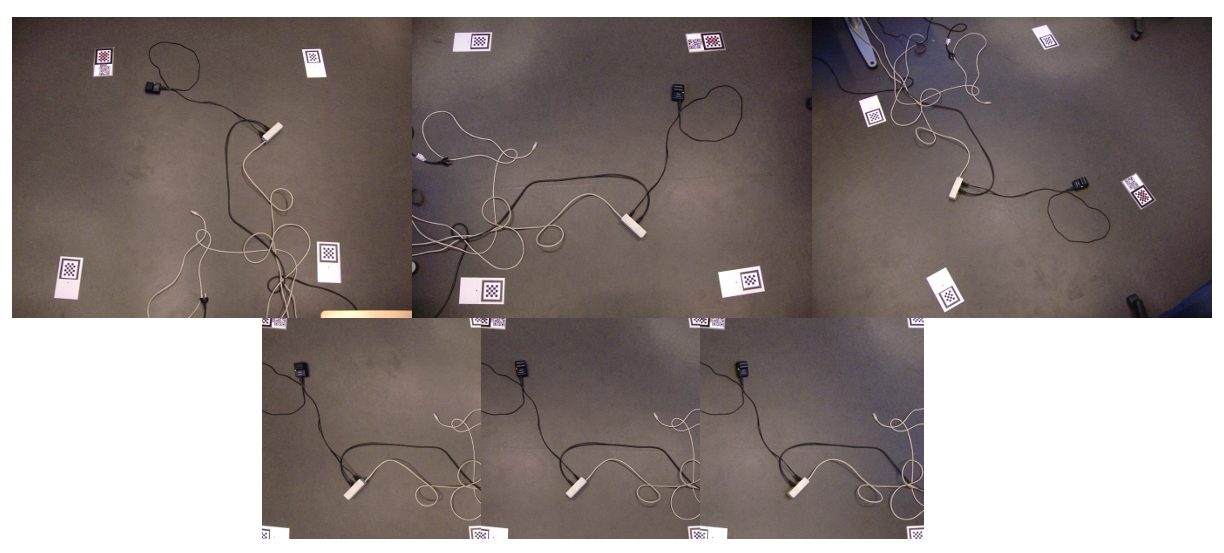
Before going home yesterday I left a process running that had the latest version of the homography algorithm.  The new trial included multiple markers and changing the way of calculating the image transformation.  When I arrived this morning, I found what I had been expecting from the beginning:  a complete image normalization.  In the figure below we can see the results of this normalization.  The first row of images are directly taken from the camera and show the same “plot” taken from different perspectives.  The second row shows the same image but after the normalization process.  Notice that the cables and electrical boxes in the second row are always in the same place (in the image plane) whereas they are scattered in different positions (in the image plane) in the other images.

Multiple Marker Comparison

Multiple Marker Comparison

One of the main changes from previous experiments was the transition from warpAffine to perspectiveAffine (opencv functions).  Warp affine assumes parallelograms.  This is ok if one is transforming to a parallelogram; that is the parallel corners in the original image would need to stay parallel in the transformed image; but in our case this caused shifts in the resulting images and reduced the accuracy of the normalization. Therefore we turned to the perspectiveAffine function that does not have this restriction.  An initial parallelogram can be transformed into a trapezoid giving more freedom for the resulting pixels to go where they are supposed to go in the normalized picture.

The second main change is the use of 3 additional markers. I chose to test with 4 markers not because the perspectiveAffine function needed 4 points; but because I thought that the normalization accuracy would greatly increase if the 4 points contained the region of interest.  One of the things I observed with my previous experiments was that the accuracy decreased in pixels that were far from the region contained within the warp points (points used to calculated the transformation).  It seems that the change was successful as the region contained inside the 4 markers shows little variability between consecutive images (increase accuracy).

A question that might arise is the need for all this when one can clearly pinpoint the cables in the image.  This is true for the example images that have few artifacts and have a background that facilitates identification, but doing the same thing in images like the ones from Zackenberg is more difficult because of the size of the objects of interest (extremely small) and the amount of noise in the image. It is my opinion that this technique greatly improves gathering data from plots in an image format.

This technique could be compared to the way phenological data is usually gathered: 1)hand counting the plant occurrences and 2)deploying automatic cameras in strategic points.  It is my intention to find out the cases in which this technique might be better in terms of collection time, initial cost, maintenance cost, collection process and other relative dimensions that I have not thought of yet :)

Posted in annotation, opencv, PhD | Tagged , , , | Leave a comment

Remember cmucam

The resulting pictures from the cmucameras where of very poor resolution.  The colors were not very stable and we couldn’t make out any shapes.  The next step with the cmucam is to increase the resolution in hope that it will be enough for our purposes.  I have already bought a higher resolution sensor (OV7620) and plan to use it with the cmucam boards that I already have.  There is a comment on the cmucam website that gives a hint of were to start.  I’ll probably get back to this at the end of the year.

Posted in PhD | Tagged , , | Leave a comment

Markers are probably best placed in the middle of the plot.

This post is about the pictures I received from Greenland.  I put them through the image normalization algorithm (That uses homography to corerct things) and the results were a little disappointing :(.  There are two aspects of the transformed images that I want to mention: 1. the accuracy of the id detection and 2. the accuracy of the homography normalization.

With respect to the id detection; that is, classifying the information contained in the color chessboard; the algorithm had 100% accuracy with the pictures that I received.  The classification for all the pictures took a while (30 mins for 68 pictures, 30s/picture).  I was very happy with this behavior and think I can , for the time being, stop touching the logic for the id extraction.

The accuracy of the homography was not so smooth as the id detection.  The sections of the picture that are close to the chessboard marker normalize beautifully.  I can barely notice the difference when I go from one picture to the other.  But as you move away from the marker the correspondence from picture to picture is not that good.  It’s so bad that in some cases the same point moves several hundred pixels when one changes image.

One of the problems I detected with the current process is that the marker is in one of the corners of the image.  This means that the opposite corner to the marker will have little correspondence between images.  To make my point I have created a little clip.  While watching it compare the behavior of the part that is close to the marker and the part that is far from the marker.

To solve this issue I think it is best to put the marker in the middle of the plot.  I know this sounds counter intuitive because it would be blocking part of the plot.  But if you consider the size of the marker, there is not much information that is lost.  I’m going to try this out when I go to Greenland in half a month.

Posted in PhD | Tagged , | Leave a comment