Idea: Getting the color of a flower from a flower

Just wanted to jot this down before I forget it….

I have been working under the assumption that to make a “good” vision algorithm, I should first find an object that is “easy” to detect and then build additional elements from that. In this way I have been using the chessboard as my initial “easy object” and have added stuff on top of that. The additions were made easy because I had something that I could trust: the position of the chessboard corners. With the location of the chessboard positions, I was able to locate other important elements: like a square that contained a color sample.

What if we extrapolated this way of thinking directly into the detection of elements inside a plot? What if we could take an “easy” object (like the chessboard) and use it to locate and sample the organisms of interest in the plot? Wouldn’t that increase the success rate of the detection algorithm?

The algorithm would first find the easy constructs (like a square). These would be very robust against things like lighting differences and perspective warps. Within this initial construct there would be contained an element of interest (like a flower). This element of interest would be “easily” separated from the initial construct because we fully know and understand it (the construct). This would enable the algorithm to sample things like color and shape. This sampling would be done per image instead of trying to generalize for all images. Remember that images are highly variable not only in terms of what is being imaged; but in the mechanism of the image itself.
Posted in PhD | Tagged , | 2 Comments

How to post on Facebook

I found a document some time ago that contains a study done by a marketing firm about the best way to increase the readers of  a facebook post. The pdf that contains the summary of the study is here. The study contains simple observations that might apply for your situation. Am not sure if what it states still applies, but it will at least get you thinking about when is the best time to post :)

Posted in Uncategorized | Tagged , , , | Leave a comment

Impressive phenology related project.

Received this from one of the Zackenberg biologists. It is extraordinary how they can get so much detail. At the moment I am not sure how they get this resolution and am not sure if it would be applicable in environments where small individual flowers are to be counted.

Gigavision demo from TimeScience on Vimeo. Annotation tool.

Posted in Uncategorized | 2 Comments

Share a git repository

I am involved in a project that decided to use git to share/keep-track of the generated source code. Our research group has a common server that has git installed. I was under the impression that we could just put a “bare” git repository in the server and everything would take care of itself. I was wrong :)

The problem has to do with the default permissions in the system. When user A pushes stuff to the repository, it creates objects (read files and directories) with the default permissions of that user. In a our systems the default permissions don’t allow the group to write to files. This means that the next commit from user B will try to modify an object with incorrect permissions.

There are various ways to solve this: change the default permission mask for all users. yuck!!!!. Luckily we are using git, which has a sound way of doing things. I used the –shared option of the init command. This allows you to specify the way the permissions should be handled. By default git uses the default of the system (the way it should be). But with the –shared option you can change this behavior. I used the following command to start my repository in the server:

git init --bare --shared=0660

This command will create a bare empty repository that will allow everyone belonging to the group to read and write. This means that if the user pushing is part of the repository group, he will be able to commit. And the objects created with that commit will be created with permissions that will allow the next user to push.

For more information about the options of the “init” command, you can type `man git-init`:) Hope this helps!

Posted in git | Tagged , , | Leave a comment

Masters Document Prezi presentation

Here is my Masters Thesis presentation :) To embed it into WordPress I used this link. I now need to figure out how to add voice recordings to the whole presentation. It would be cool that people could just click through the presentation and hear you speak while you present :).  I think we can hack a solution out of this link :)

Hopefully the next post will have the complete presentation (with me speaking :). Enjoy.

Posted in Uncategorized | Leave a comment

Publishing google earth tour

I recently finished making link budget analysis for Abisko and Zackenberg. This was done for a PhD Wireless Sensor Network class that I am attending. After having a very interesting discussion in class about the wireless link budgets in both places, we decided to try to put all this in a place where people can access it and see it.

Google earth has a really cool feature that lets you make a tour on top of your maps (Play the embedded youtube video to learn more). I thought it would be cool to create a tour of Zackenberg and Abisko showing what we had discussed in class. These tours would contain things like 3D Fresnel zones and color charts showing the reach of the wireless signal within a terrain map.

As you could have noticed from the video, it is very easy to create a tour map. There is even a possibility of including some narration in the tour; which I chose to ignore, as I wanted something very simple. From this point I needed to be able to share my creation with the rest of the world. I wanted to avoid just putting a file (KMZ extension) on the on the web and expect people to just download it. Instead I found a video that explains how to embed the tour file into regular html code. One still has to upload the KMZ file to somewhere; but once that is done, it’s very easy. Checkout the next video that explains just how to do it. Here you will find the link to the gadget thingy.

This is all really cool until I found out that I and all linux users were probably not going to be able to see the embedded tour. The reason for this is that there is no google earth plugin for linux. There is a google earth for linux, but no plugin to use it in the browser. For all those linux user out there here is the link. The rest of you could have seen it in this post if wordpress.com would have allowed me to paste the html code to my post. Since this is not the case, I have to put it here for your viewing pleasure :) Might be time to move to wordpress.org ….

Posted in PhD | Tagged , , | 1 Comment

Wireless Link Calculations: Radio Mobile

Am taking a PhD course at ITU about Wireless Sensor Networks. Our first assignment is related to finding a link budget for two sites of interest: Zackenberg and Abisko. In Zackenberg we tackle a 21 Kilometer link between two points separated by water. In Abisko we tackle a 9.6 Kilometer link that has obstructions (mountains) in the middle.

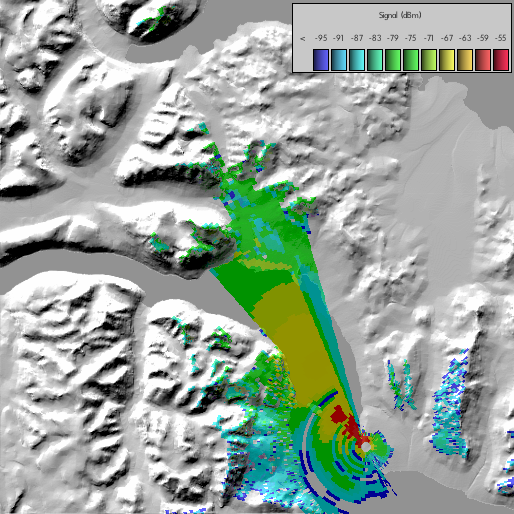
Signal Behavior from Danneborg

Signal Behavior from Danneborg

I was not too worried about the Zackenberg link because I had already been there and knew that there was line of sight between the two points we were supposed to connect. But I have never been to Abisko and had now idea how to find out what the conditions were. I sincerely did not see how we could come up with anything descent by just using the GPS coordinates. And then I installed Radio Mobile.

Radio Mobile is an application that is made for window, so I had to use wine to make it work [1] (The instructions for windows are here). It does not work at its full potential when using wine: there are some labels that don’t appear correctly and the text areas are strange. But it’s not unusable :).

Radio Mobile needs the GPS coordinates from the two connecting sites and additional information about type of antennas, signal frequency, cable loss and connector loss (among others). Once you have input data you can create really nice images depicting the theoretical behavior of the wireless signal in the surrounding terrain. In the “signal behavior” figure we see that the signal grows weaker as the distance increases. We also see how the surrounding mountains prevent the signal from spreading completely into the valley.

2.5GHz Abisko

2.5GHz Abisko

There is another graph that can be created that depicts the conditions of a point to point connections. It contains lots of data about signal (like antenna gain, cable loss, antenna placement, Fresnel Zones…) and terrain. IMO, this type of graph is the one that most clearly describes the connection behavior between two points. In the case of Abisko the graph hints at a problem with 2.5GHz signals (figure 2.5GHz). There is connection at the peaks of the hills, but there is no connection at the end points. Notice how this is color coded on the terrain.

900MHz Abisko

900MHz Abisko

On the other hand, for 900Mhz the figure is completely different and hints at a better connection (figure 900MHz). Notice how all the hill is now green. Also notice how the Fresnel zone has grown.

And if all this was not enough, Radio Mobile has an additional feature to export to google earth format. This means that all the figures in this post can be seen in google earth. This give GREAT versatility as one can pan and zoom the terrain around the place of interest. One can also notice potentially important land marks like roads that are close to the link (giving further insight into the interference and other factors).

All in all, it is a REALLY AWESOME app!!!!

[1] Download the Radio Mobile files into a freshly created directory (file1, file2). Download the MSVBVM60.DLL file from the web (I just googled it) and put it in the newly created file. After you unzip the first two file, you should execute `wine rmwdlx.exe`.

Posted in PhD | Tagged , , , , | Leave a comment

Pan, Zoom | GTK, QT

One of the selling points for choosing Matlab when implementing the phenological annotation tool was the ease with which one could create pan zoom actions on an image. Now that I have fresh ideas to continue the annotation tool development, I wanted to give other frameworks a try. So I set off to try to implement (or download an implementation) of a pan/zoom mini application. I needed something that could zoom in/out smoothly while at the same time pan the image in whatever zoom level. These two functionalities had to work for images that were a bit on the big side: 22 megs (I know that this is nothing compared to GIS images, but it still needs to be done correctly).

I started with Qt and found an example here. I was very excited to see that it was very smooth on the example. But when I replaced the generated image with one of my 22 meg pictures, I got a disappointing surprise: When scaled out of its original zoom level, the pan and the zoom where very jumpy. I threw all kinds of tricks at it too see if I could make it smoother. Along the way I found some people who were having the same problem (herehere and here). None of those links gave me a solution that was satisfactory.

Today, after getting extremely frustrated with the QT example, I decided to switch to Gtk and see what it had to offer. I manged to create a working example with a very smooth zooming and panning of my 22 meg picture. The code I used is part of the test directory of the GtkImageViewer project. I still have to see how easy it is to place (and keep track) of additional objects in the canvas; but I think that Gtk is the way to go.

Posted in Uncategorized | 4 Comments

A project similar to my annotations

This is a really cool web-based annotation application. Things that they have in common with my annotation application is the need of zoom, pan, on image annotation. They have nice features like color coding and the ability to create custom annotations. They target a usability that is a bit different from what I am targeting. They use the software to handle very big images. So they have issues that I will not face: like tiling.  It’s a very good source of ideas :).  The video is posted here.

Posted in Uncategorized | Leave a comment

Argument for the use of photo-plot phenology

When I interviewed the biologists about the new work-flow for plant phenology (now baptized photo-plot pheonogy) one of the major concerns across all the interviewees was the time it would take to complete the phenological counts with the photo-plot method. One of the hypothetical situations that was mentioned (more than once) was that the person doing the photo-plot counts needed to search for additional elements in every picture. At the time I accepted this defect as something that was inevitable, but now I realize that we might be able to mitigate it.

The trick would be to begin the photo-plot counts at the point when the plot is in peak production. This first count would be extremely time-consuming, but it’s a price you only pay once. After the first time you will have reference annotations when you move forward or backward in the time series. This does not mean that you wouldn’t have to look for additional stuff, it just means that most of the work would be done at the beginning of the process.

Posted in Uncategorized | Leave a comment
